Aspect Ratio
View each item’s exact aspect ratio and closest common ratio, making it easier to choose generation or cropping sizes for images, videos, and animated files.
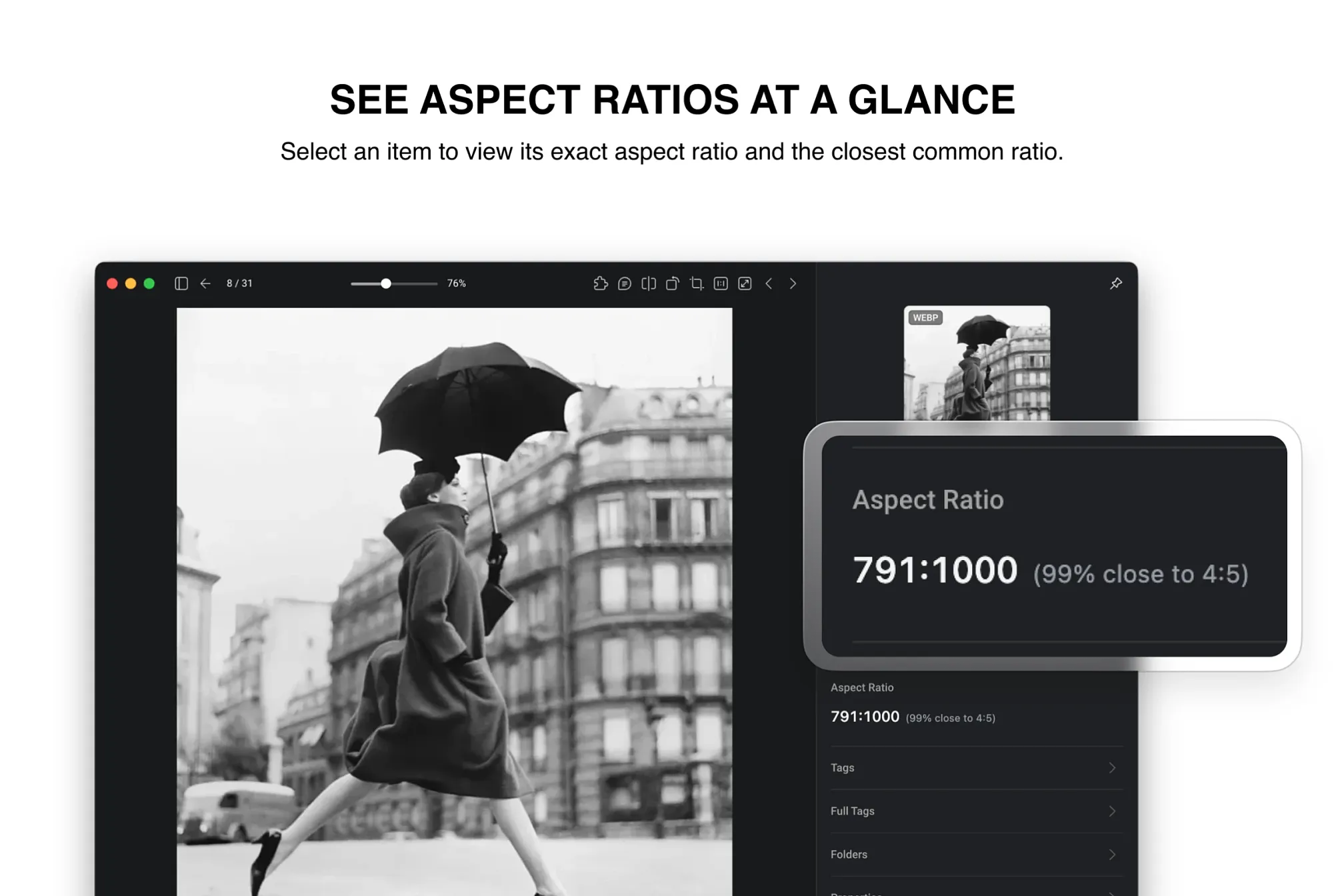
Aspect Ratio is a simple Eagle Inspector plugin: select an image, video, or animated file, and it shows the item’s aspect ratio directly in the right sidebar, along with the closest common ratio.
The motivation is straightforward: sometimes you don’t just need the pixel dimensions — you need to quickly understand whether an image is closer to common ratios like 1:1, 4:5, 3:4, 16:9, or 9:16. This is especially useful when generating images with AI tools, where output sizes are often based on preset aspect ratios and unusual custom ratios are harder to reproduce. This plugin helps you choose a more accurate common ratio for generation or extension.
The plugin only reads width and height information provided by Eagle. It does not parse source files, modify your assets, or require a network connection.
Initial release: Shows item aspect ratios in Eagle’s right-side Inspector and suggests the closest common ratio. Supports images, animated files, and videos.
You may also like