Video Fetch
One-click video downloading from X, YouTube, Instagram, TikTok and Vimeo directly into your Eagle library. Auto-install, batch mode, keyboard shortcuts, custom frameless UI.
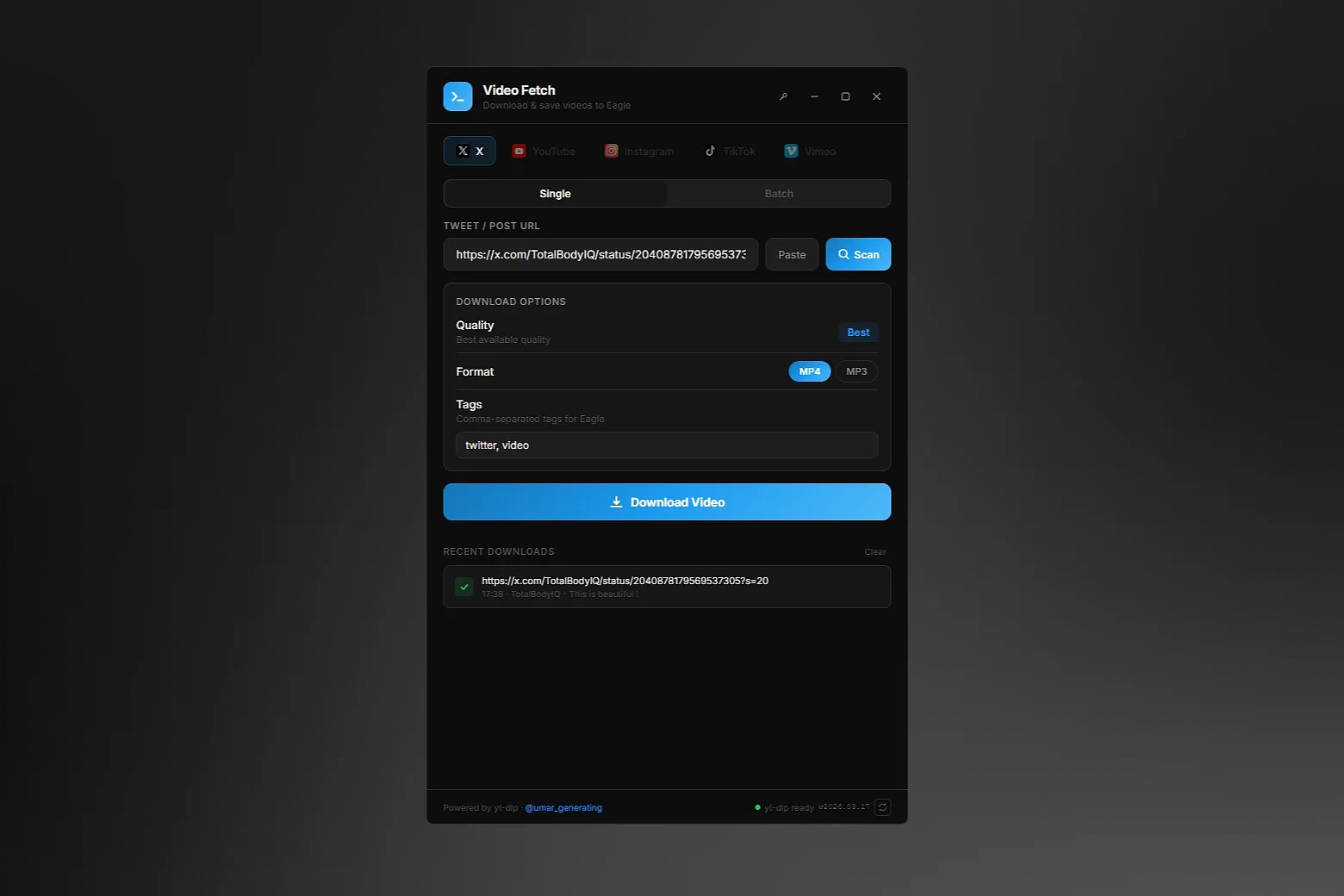
Video Fetch brings one-click video downloading from major social platforms straight into your Eagle library.
Supported Platforms
- X (Twitter) — posts, quotes, threads with video
- YouTube — any public video with quality & format selection
- Instagram — Reels, Posts, Stories, IGTV
- TikTok — watermark-free downloads
- Vimeo — public videos, ideal for design & motion references
Key Features
- Auto-detects supported URLs from clipboard on plugin open
- Real-time download progress with shimmer animation and stage indicators
- Smart folder awareness — imports into your currently selected Eagle folder
- Custom tags per download, with platform-specific defaults
- Per-platform color themes that switch automatically with spring animations
- Batch mode — paste multiple URLs, downloads run 3 at a time
- Video preview with thumbnail, title, channel, duration and view count
- MP4 video or MP3 audio extraction for all platforms
- Download history with one-click re-use
- Native OS notifications on completion
- Automatic temp file cleanup
Custom Window
- Frameless dark UI — no standard Windows/macOS title bar
- Pin button — keep the window always on top while browsing
- Minimize, maximize, close — all custom-styled controls
- Double-click header to maximize/restore
Keyboard Shortcuts
- Ctrl/Cmd+V — paste URL and auto-scan
- Enter — start download
- Escape — cancel all active downloads
Dependencies
- yt-dlp and ffmpeg can be auto-installed with one click from inside the plugin — no terminal needed
- One-click yt-dlp update check and upgrade from the footer
### v1.5.1 — Eagle review compliance
**Integration with Eagle's built-in FFmpeg** - Added `"dependencies": ["ffmpeg"]` to manifest.json — Eagle now auto-prompts users to install the FFmpeg Dependency Plugin on
first run
- yt-dlp resolves FFmpeg via `eagle.extraModule.ffmpeg.getPaths()` and receives the path through `--ffmpeg-location`
- Banner button "Install FFmpeg plugin" opens Eagle's managed installer (`eagle.extraModule.ffmpeg.install()`) instead of
downloading a standalone binary
**Removed**
- Bundled FFmpeg download flow (~130 MB zip from yt-dlp/FFmpeg-Builds and evermeet.cx)
- `getLocalFfmpegPath`, `checkSystemFfmpeg`, `downloadFfmpeg`, `findFileRecursive` from `binManager.js`
- PowerShell/unzip extraction logic and `.eagle-videofetch/bin/ffmpeg*` binaries
**Requirements**
- Eagle 4.0 beta 7 or later (required for `extraModule.ffmpeg`)
**Unchanged**
- yt-dlp auto-install/update flow
- All provider logic, UI animations, download queue, keyboard shortcuts
Changelog v1.3.0:
- Auto-detect platform from URL with animated Scan button - Video preview (thumbnail, title, channel, duration, views) for all providers - Dynamic YouTube quality selection from actual available formats - MP4 / MP3 format toggle for all providers
- Stop button to cancel active downloads
- One-click auto-install for yt-dlp and ffmpeg
- Per-provider branded gradient themes
- Thumbnail proxy for Instagram/TikTok (bypasses CDN restrictions)
- Fixed progress bar stuck on "Preparing"
- Fixed MP3 downloads not importing to Eagle
- Refactored providers to eliminate code duplication
- Cleaned up dead code, hardcoded strings, and var declarations
You may also like