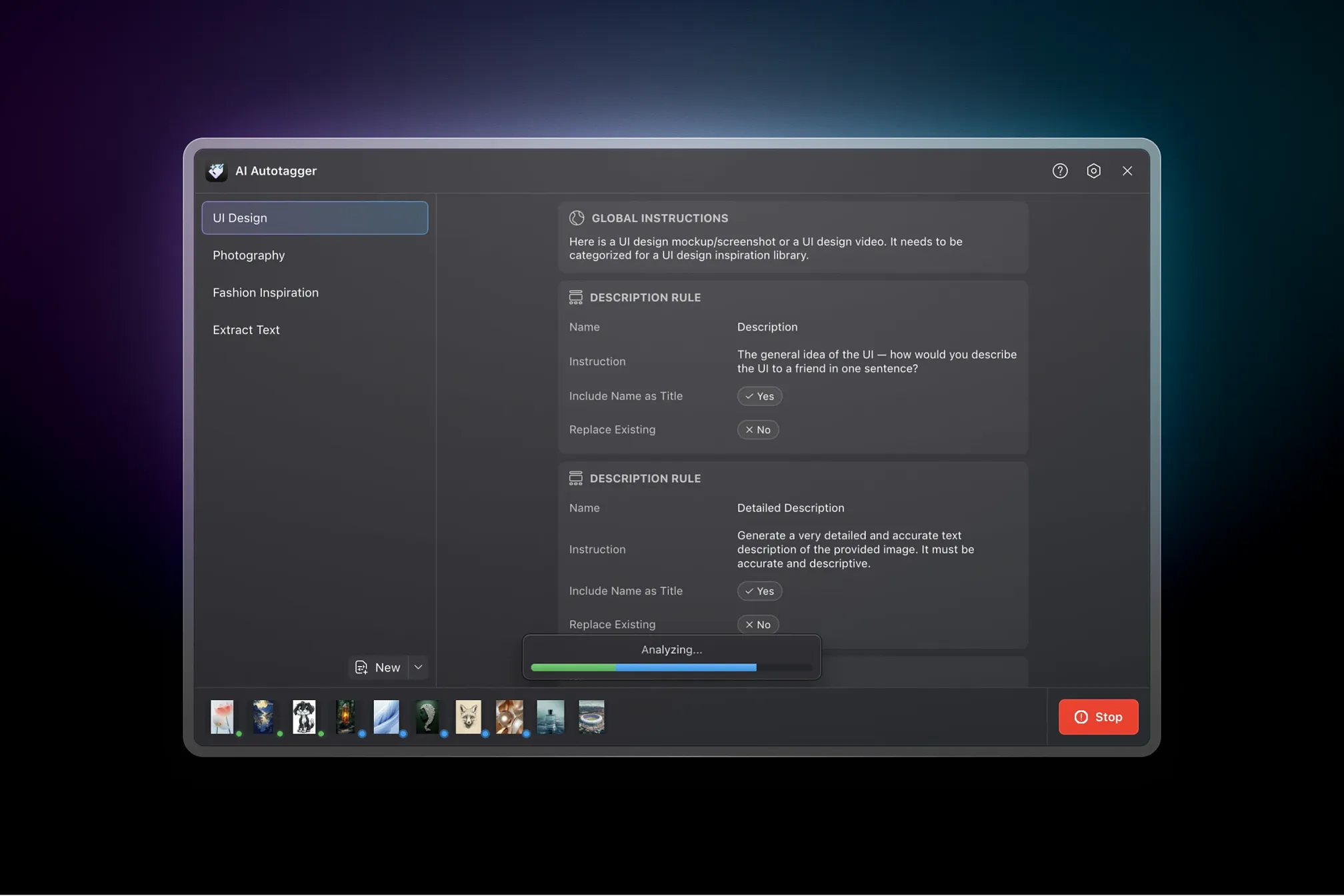
Stop losing assets in your library. Start finding them instantly.
AI Autotagger analyzes your images and videos with vision language models — OpenAI, Anthropic, Google, OpenRouter, or local options like Ollama and LM Studio — and writes tags, names, and descriptions back to Eagle based on rules you define. Over 10 million items processed per month by designers, photographers, and researchers who got tired of manual tagging.
Why AI Autotagger?
Most auto-tagging tools are black boxes. They guess what tags you want and offer no way to customise the output. You end up with generic labels like "photo" or "design" that don't match how you actually think about your assets.
AI Autotagger is different. You create presets with specific rules: what tags to generate, whether to rename items, what descriptions to write, and how the AI should interpret your content. Photography, UI design, fashion, OCR, product photos — the same engine handles all of them, because you control the instructions.
Want the AI to identify lighting conditions and camera angles? Add a rule for that. Need it to extract brand logos and categorise by company? Write that instruction. The flexibility means one plugin adapts to whatever you're collecting, rather than forcing you into someone else's taxonomy.
Key Features
Choose from 8 AI providers — or run models locally for free
Works with OpenAI, Anthropic, Google Gemini, and OpenRouter — or run models locally with Ollama and LM Studio for free, offline, private use. You can also use Claude Code CLI or Codex CLI if you'd rather use your existing subscriptions than pay per API call.
Custom model names are supported, so you can use new models the day they're released without waiting for a plugin update.
Define exactly what tags you want — not what the AI guesses
Control exactly what metadata gets generated:
- Tags — merge with existing tags or replace them entirely. Provide example tags (the AI uses your style as guidance) or a fixed list (the AI picks only from your options). Add prefixes or suffixes to group related tags together.
- Names — rename items based on their content. Useful for cleaning up "IMG_20240115_143052.jpg" into something searchable like "sunset-beach-golden-hour".
- Descriptions — detailed captions, OCR text extraction, or custom analysis. You can have the AI write a one-sentence summary, a detailed breakdown, or extract every piece of visible text.
Rules are grouped into presets. Switch presets instantly to handle different content types — run Photography on your camera imports, then switch to UI Design for your screenshot collection.
Start in seconds with 6 built-in presets
Ready out of the box — start analysing immediately:
- Photography — Identifies subject matter, lighting conditions, colour palette, mood, and photographic genre. Suggests similar artists and notes time of day or season.
- UI Design — Recognises interface components (buttons, cards, modals), higher-level patterns (dashboards, login forms, pricing tables), device type, colour scheme, and typeface styles. Extracts visible text for searchability.
- Fashion Inspiration — Categorises garments, identifies styles (streetwear, haute couture, athleisure), notes colour palettes, patterns, and textures. Detects era influences and setting context.
- Extract Text (OCR) — Pulls all visible text from screenshots, scanned documents, and images. Preserves hierarchy and formatting where possible.
- Rename Item— Generates descriptive filenames based on content while preserving important information from the original name.
- Custom — Start from scratch and build exactly what you need.
Each preset is fully editable. Use the defaults as starting points, then customise the rules to match your workflow.
Describe a preset in plain English — AI builds it for you
Not sure how to structure a preset? Describe what you want in natural language, and the AI writes one for you.
For example: "Create a preset for categorising product photos. I want tags for product type, primary colour, and material. Also generate a short descriptive filename."
The generator produces a complete preset with appropriate rules, example tags, and instructions. Tweak the output if needed, or use it as-is.
Organise presets into folders — back up and restore anytime
Keep your presets tidy:
- Folders — Drag-and-drop presets into folders to group related workflows
- Duplicate — Clone a preset as a starting point for variations
- Import/Export — Share presets as JSON files, or back up your setup
- Automatic backups — The plugin saves snapshots so you can restore previous versions if something goes wrong
Analyze videos properly — not just the thumbnail
Videos are analyzed using multiple frames, not a single thumbnail. The plugin extracts frames at variable rates depending on video length: shorter clips get more frames per second, longer videos get representative samples spread across the duration (up to 60 frames total).
This means the AI sees what actually happens in the video, not just whatever frame Eagle happened to pick for the thumbnail.
Never re-process the same item twice
Skip rules prevent re-analysing items you've already processed. Configure a skip tag — when the plugin sees that tag on an item, it leaves it alone. You can also have the plugin automatically add the skip tag after processing, so items are only analyzed once.
This makes incremental workflows practical: run analysis on new imports without re-processing your entire library.
Know exactly what you're spending — in real-time
Token usage and cost estimates update as you work. The cost widget shows running totals for the current session, broken down by input and output tokens.
Each model has configurable pricing, so when providers update their rates you can edit the numbers and keep your estimates accurate. Local providers (Ollama, LM Studio) show zero cost since they run on your hardware.
API keys encrypted locally — your credentials stay yours
API keys are encrypted with a password you set before being stored. The password itself is never saved — you'll be prompted to unlock when starting an analysis session.
If you forget your password, you can reset and re-enter your keys. The encryption means anyone with access to your machine's storage can't read your keys without the password.
Process your entire library while you work
Tag hundreds of items at once with configurable concurrency. Select everything you want to analyze, click the button, and watch progress in real-time.
Concurrency is configurable from conservative (1 request at a time) to aggressive (100 parallel requests). Higher concurrency is faster but may hit rate limits depending on your provider. If you need to stop, cancel any time — completed work is preserved, and you can resume the remaining items later.
Available in 8 languages
Full interface localisation: English, German, Spanish, Japanese, Korean, Russian, Simplified Chinese, and Traditional Chinese. The plugin detects Eagle's language setting automatically.
How It Works
- Select items in Eagle — as many as you like
- Open AI Autotagger from the plugin toolbar
- Pick a preset (or create one that matches your needs)
- Click Analyze and confirm the model you're using
- Watch tags, names, and descriptions populate in real-time
That's it. The plugin handles image resizing (configurable resolution to balance quality vs. cost), API calls with automatic retries on failure, and metadata updates back to Eagle. You can filter the item list by status to see what's completed, what's processing, and what failed.
Bring Your Own Key
AI Autotagger uses a "Bring Your Own Key" model. Create an account with OpenAI, Anthropic, Google, or OpenRouter, generate an API key, and paste it into the plugin. You pay the provider directly for what you use — no middleman markup, no subscription fees.
For completely free, offline, private use: install Ollama or LM Studio, download a vision-capable model like LLaVA, and point the plugin at your local server. Your images stay on your machine, and there's no ongoing cost beyond electricity.
What People Use It For
- Designers — You've saved 3,000 UI screenshots. Good luck finding the one with the gauge chart. AI Autotagger tags by component, pattern, and colour scheme — so "dashboard gauge chart dark mode" actually returns results.
- Photographers — Every shoot adds hundreds of images to your library. Manually tagging each one? That's hours you could spend shooting. Let the AI handle subject, lighting, mood, and genre tags while you edit.
- Researchers — Scanned documents, PDF screenshots, article clippings — all unsearchable until you OCR them. The Extract Text preset pulls every word and makes your paper archives queryable.
- Content creators — Your downloads folder is full of "screenshot-2024-01-15.png" and "IMG_4829.jpg". The Rename preset turns those into "twitter-thread-design-systems-dark-mode.png" — files you can actually find six months later.
- Fashion archivists — Categorise garments by style, era, brand, colour palette, and texture. Build a reference library where "1970s bohemian floral maxi dress" returns exactly what you'd expect.
Getting Started
- Install the plugin in Eagle (Preferences → Plugins → Add Plugin)
- Open Settings and choose a provider
- Add your API key (or configure a local server URL for Ollama/LM Studio)
- Select some items and click Analyze
Custom OpenAI-compatible provider for connecting any API that supports the OpenAI format
AI Preset Generator now works with CLI providers (Claude Code, Codex)
In-app update notifications for important announcements in the Updates dialog
Warning when refreshing very large item selections to prevent slowdowns
Improved video processing with clearer errors when ffmpeg is unavailable and timeouts that scale with video length
Fixed: Preset drag-and-drop no longer crashes in certain positions
Fixed: Tag modifier text can now be left empty
Fixed: Ollama custom model name no longer resets unexpectedly
- AI-powered preset generator — describe your tagging needs in natural language
- Preset backup and restore tools — automatic backups, plus manual backup and restore
- Password-protected API key storage with unlock and migration for existing keys
- Experimental Claude Code CLI and Codex CLI provider support — use local CLI tools instead of API calls
- OpenRouter provider — access multiple AI models through a unified API
- Per-provider advanced settings for temperature, max tokens, and thinking budget
- In-app Help dialog with documentation and FAQs
- Preset folders with drag-and-drop reordering — organize presets into folders in the sidebar
- Add individual default presets from the "Defaults" submenu in the New button dropdown
- Claude 4.5, GPT-5.x, and Gemini 3.0 model support
Simplified Chinese, Traditional Chinese, German, Japanese, Korean, Russian, and Spanish language support
- Real-time item status updates when refreshing or switching presets
- Improved memory management during batch processing
- Various UI fixes
Fixed: LM Studio and Ollama base URLs couldn't be changed
Fixed: maxTokens error
Added option to process items using their thumbnail images (e.g., SVGs)
Added support for tag modifiers with configurable position and spacing
Improved processing for very large inputs/outputs (e.g., long documents)
Version 7 (Included in this release)
Added Ollama and LM Studio support for local model inference
Improved model selection UI, including allowing custom model names so you can now use the latest models as soon as they're released
Added option to resize items before AI processing (improves speed/cost)
Added Gemini Flash 8B model
Improved UI freezing issues when processing many items
Added detailed logs for each item
Fixed: Item names longer than 245 characters are now truncated to avoid data corruption
Added Ko-Fi button for those who want to support the project
Auto-refresh items when you change the selection in the main Eagle window
Copy and paste presets — share presets with people!
Option to send low-res versions of images/videos to reduce API cost
Improve reliability of Google's Gemini 1.5 models
Various bug fixes and UI improvements
Fix double-paste API key bug on Windows
You may also like