Files to Folders
Automatically organize selected files into folders by file, domain, path, or source link.
Instructions for use:
1. Select files for processing.
2. Choose an operation mode: 'Copy', 'Soft Move', 'Hard Move'.
3. Configure additional settings if needed.
4. Click the 'Run' button for the desired file grouping mode.
----- ----- ----- ----- -----
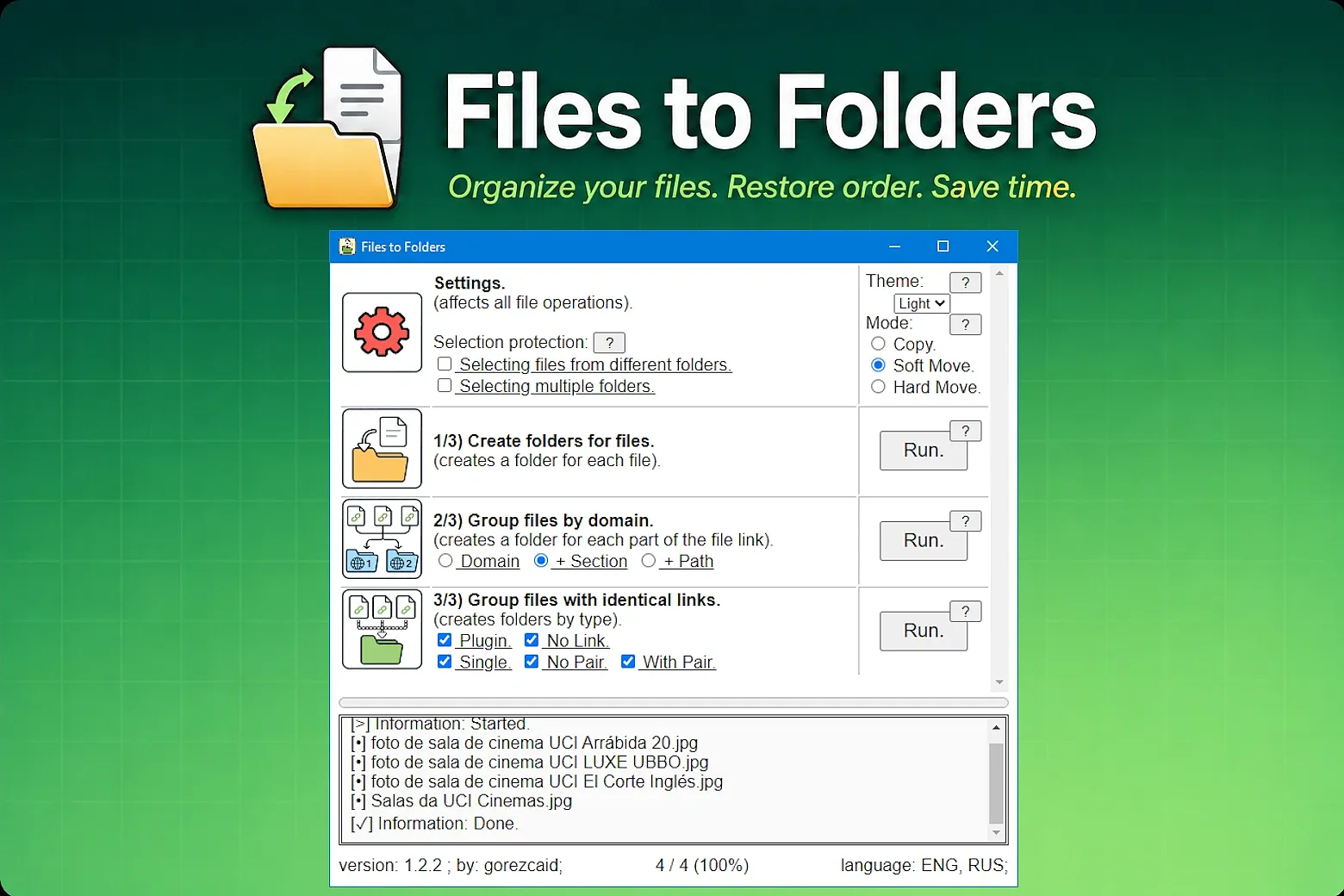
Settings:
Selection protection (resets automatically):
- 'Selecting files from different folders' — allows selecting files from different folders at the same time.
- 'Selecting multiple folders' — allows selecting multiple folders at the same time.
Theme:
- 'Auto' — automatic interface theme selection.
- 'Light' — light interface theme.
- 'Dark' — dark interface theme.
Mode:
- 'Copy' — copies the file into a new folder.
- 'Soft Move' — moves the file only from the selected folders.
- 'Hard Move' — moves the file from the entire library into a single folder (the file will no longer exist in multiple folders at the same time).
Button '1/3) Create folders for files':
- Creates a new folder for each selected file.
- Uses the file name as the name of the new folder.
- Copies or moves the file into the new folder.
Button '2/3) Group files by domain':
Creates a folder hierarchy based on parts of the website link:
'site.com' + '/name' + '/.../file.html'.
- 'Domain' — groups files only by website domain.
- '+ Section' — additionally groups files by the first part of the website path.
- '+ Path' — additionally groups files by the full website path.
Button '3/3) Group files with identical links':
Finds files with identical links and automatically groups related files together.
- 'Plugin' — temporary service folder for speeding up file operations.
- 'No Link' — files without a link.
- 'Single' — files with a unique link without matches.
- 'No Pair' — files without a full link match, grouped by website domain and part of the website path.
- 'With Pair' — files with the same full link.
Added: Text progress display for file processing operations.
Fixed: All radio buttons are now properly disabled during file processing.
Added: Built-in help system with '?' buttons.
Added: File and folder selection protection settings.
Added: Move modes: Copy, Soft Move and Hard Move.
Added: Link grouping levels: Domain, Section and Path.
Improved: Plugin interface and settings readability.
Fixed: In the "Group files with identical links" mode, the connection protocol was removed from folder names.
You may also like